
True magnetic-north alignment
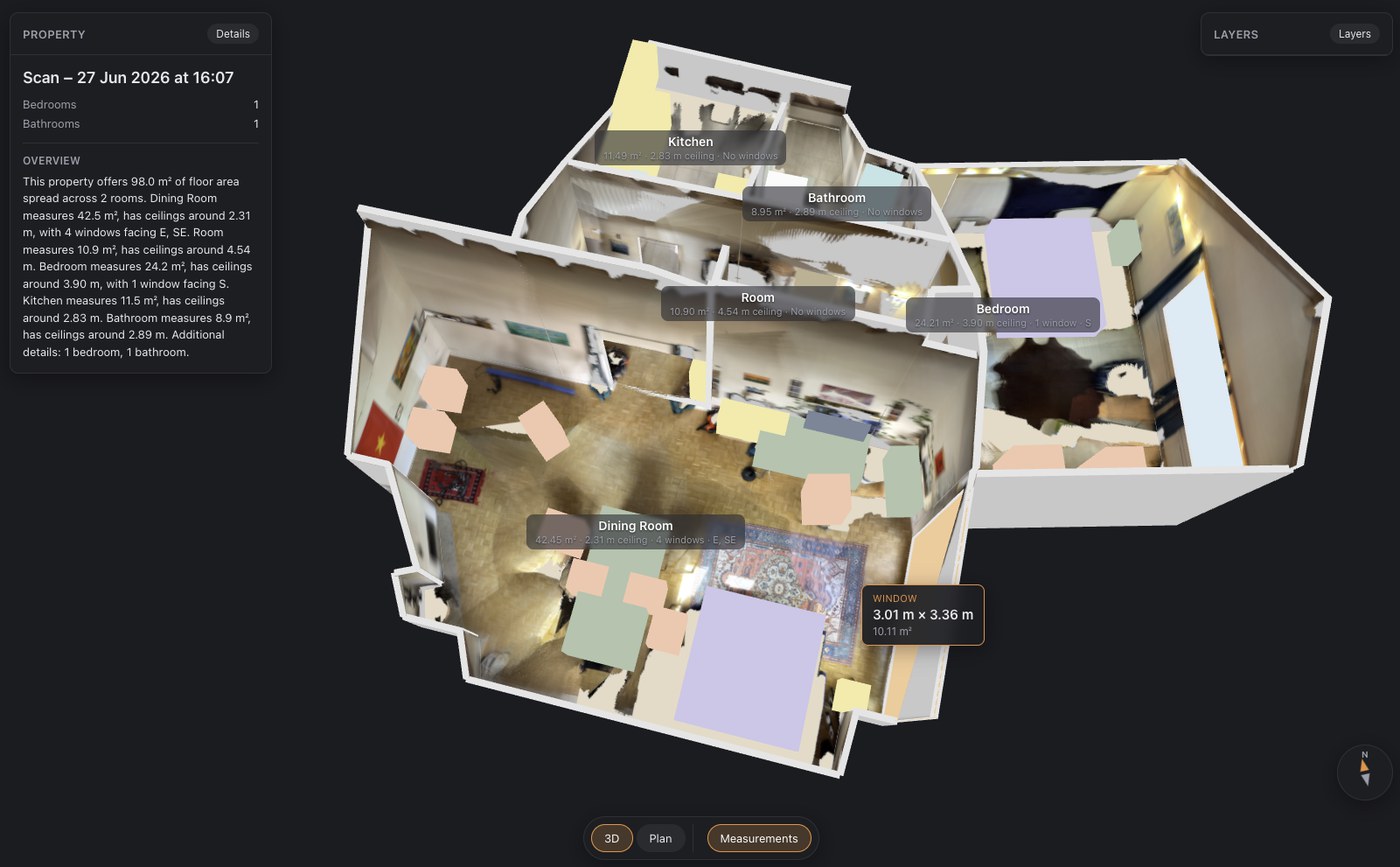
FloorLens detects the building's orientation on its own and shows a compass, so the model and the floor plan face the way the property really does instead of pointing wherever you happened to start scanning.
Walk through a home with your iPhone and FloorLens turns the scan into a floor plan and a 3D model that match the real rooms, oriented the way the building actually stands, down to magnetic north. Sharing is a web link your clients open right in the browser.
Free to scan, measure & export · Premium from $2.99/week (or local equivalent)
Any scan can become an MP4 tour. The camera moves through the home, and wherever you took a photo during the scan, the model fades into that actual picture, so viewers understand at a glance where each shot was taken and how the rooms connect. It works on plain and textured scans alike, and the clip closes with your branding, the key figures and a QR code to the 3D tour.
Put it on a listing page, upload it to a portal, post it to Instagram or answer a WhatsApp inquiry with it. Fly-through export is free, no subscription needed.
Get the app free →Upload a scan and its PDF gets a QR code and a link. Renters and buyers who open it land in a fast 3D viewer that runs in the browser, so there is nothing to install and no account to create. They can switch between dollhouse, floor plan and first-person photo views, on a phone or a laptop.
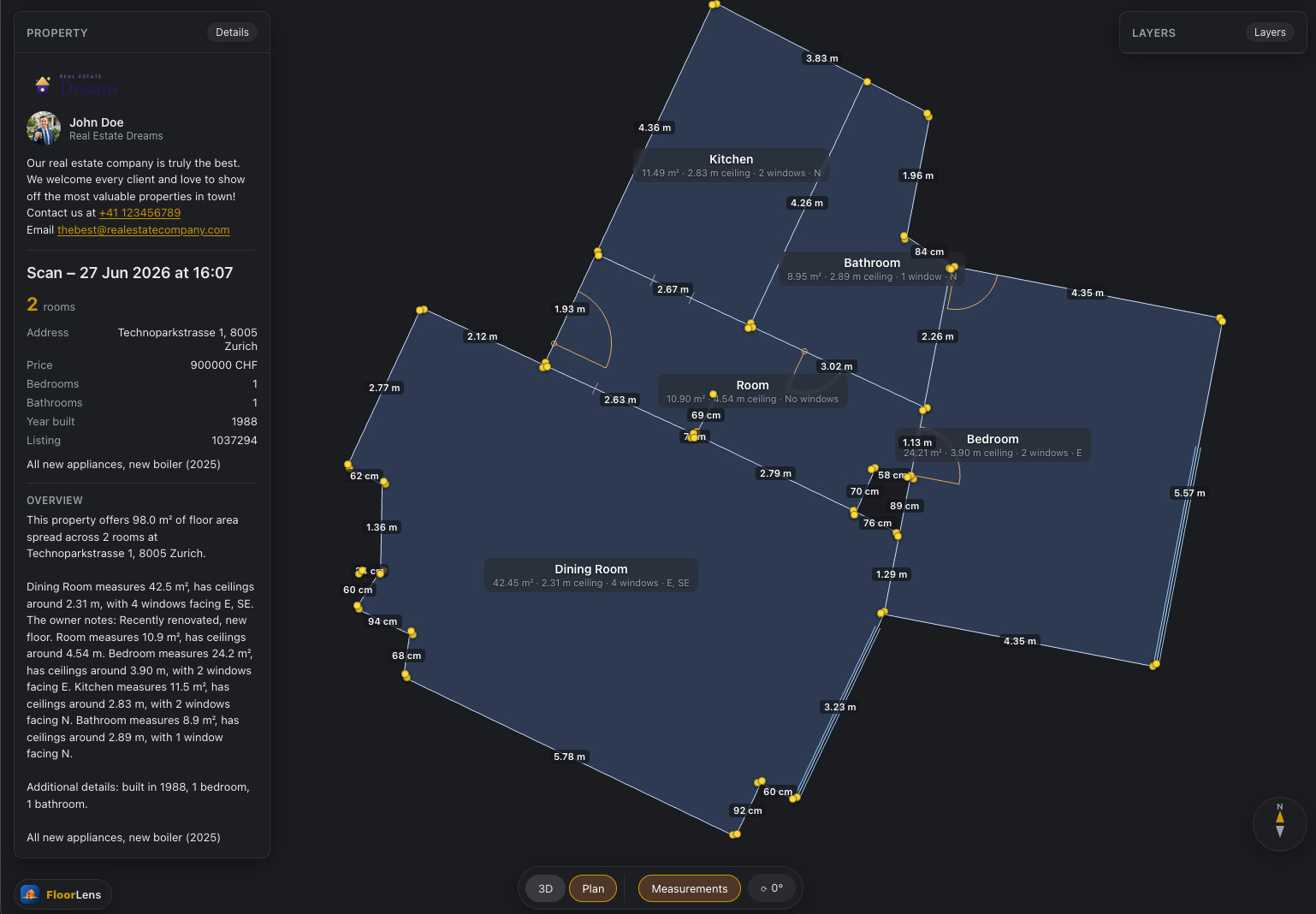
Pick your country and FloorLens reports the area figure buyers, agents and appraisers there actually use. It measures to the correct face of the wall and treats below-grade or unfinished space the way that standard says it should. Each room keeps its own area, length × width and ceiling height, and you can edit all of it.
Built in: Gross Living Area (ANSI Z765) for the United States, Gross Internal Area (GIA) for the United Kingdom and Ireland, RMS for Canada and Internal Area for Australia, plus national standards for 39 countries in all, from Wohnfläche and Loi Carrez to RERA carpet area and Strata Area. Everywhere else you get generic gross, net and floor area.
The figures are estimates derived from the scan, not a surveyed measurement. A phone scan cannot capture everything a legal definition counts (balconies, sloped-ceiling allowances, deductions for internal walls), so the results are not legally binding and must not be used for contracts, valuations or official filings.
See the web viewer →| Country | Default figure | Also available |
|---|---|---|
| United States | Gross Living Area (ANSI Z765) | Condo Living Area (interior perimeter) |
| United Kingdom | Gross Internal Area (GIA) | Net Sales Area (NSA) IPMS 3.2 IPMS 4.2 |
| Canada | RMS Area (house / townhouse) | RMS Area (apartment-style condo) Ontario Floor Area (HCRA) |
| Australia | Internal Area | Total Area (internal + external) |
| Austria | Nutzfläche (MRG) | — |
| Brazil | Área útil | Área privativa |
| Chile | Superficie útil | — |
| China | 套内建筑面积 | 套内使用面积 |
| Czechia | Podlahová plocha | Užitná plocha |
| Denmark | BBR boligareal | — |
| Finland | Asuinpinta-ala | Kokonaispinta-ala |
| France | Surface habitable (Loi Boutin) | Surface Carrez (Loi Carrez) |
| Germany | Wohnfläche (WoFlV) | — |
| Greece | Μικτό εμβαδόν Καθαρό εμβαδόν | — |
| Hong Kong SAR China | Saleable Area | — |
| Hungary | Hasznos alapterület | — |
| India | Carpet Area (RERA) | Built-up Area |
| Ireland | Gross Internal Area (GIA) | — |
| Israel | שטח דירה | — |
| Italy | Superficie commerciale | — |
| Japan | 専有面積・壁芯 | 登記面積・内法 |
| Mexico | Superficie construida | — |
| Netherlands | Gebruiksoppervlakte wonen (NEN 2580) | — |
| New Zealand | Floor Area (NZ Residential Guide) | — |
| Norway | BRA-i | — |
| Poland | Powierzchnia użytkowa (PN-ISO 9836) | — |
| Portugal | Área bruta privativa | Área útil |
| Romania | Suprafață utilă | Suprafață construită |
| Russia | Общая площадь | Приведённая площадь |
| Singapore | Strata Area | — |
| South Africa | Sectional Title Area | — |
| South Korea | 전용면적 | — |
| Spain | Superficie útil | Superficie construida |
| Sweden | Boarea | Boarea + Biarea |
| Switzerland | Nettowohnfläche | SIA 416 |
| Taiwan | 主建物+附屬建物 | — |
| Türkiye | Net m² Brüt m² | — |
| United Arab Emirates | Built-Up Area (BUA) | IPMS 3.2 |
| Vietnam | Thông thủy | — |
Most scanning apps hand you raw geometry and stop there. FloorLens keeps the context around it: which way the building faces, where the light comes from, what the surfaces look like. And whatever it captures, you can still edit, measure and share afterwards.
FloorLens detects the building's orientation on its own and shows a compass, so the model and the floor plan face the way the property really does instead of pointing wherever you happened to start scanning.
The virtual sun stands where the real one would for that location, so shadows fall through the rooms just like they do on site. Useful when someone asks about morning light in the bedroom.
Bake photo textures straight onto the walls, or capture the entire space as a fully textured 3D mesh.
While you scan, the app flags the spots it hasn't seen well enough yet. You fill the gaps right there instead of discovering them later at your desk.
Add and remove walls or objects, move, rotate and resize anything. You can also change a window into a door and set which way a door swings or slides.
Wall lengths, room areas, ceiling heights, object sizes and footprints are measured automatically. Every element in the scan carries its own numbers.
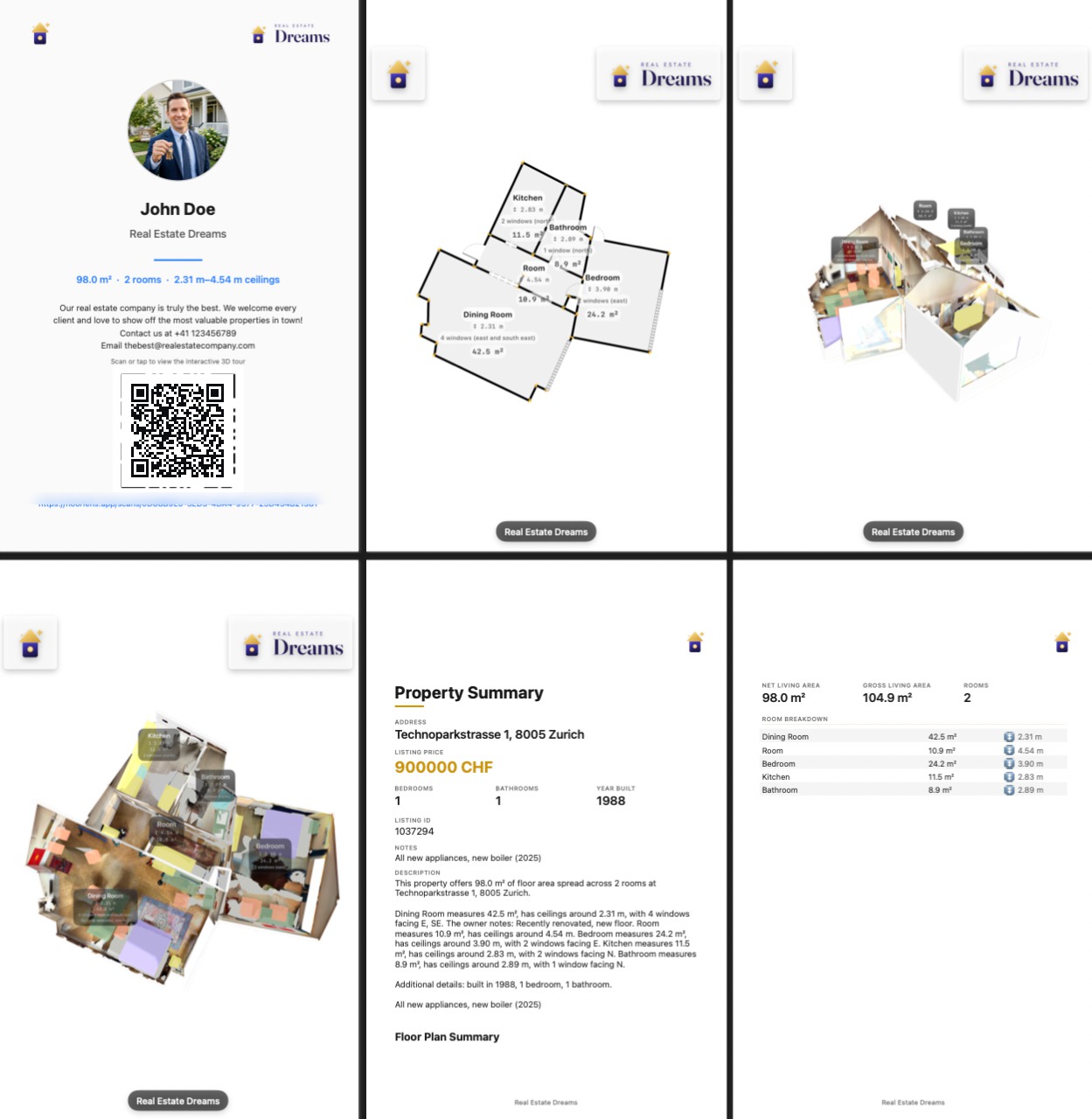
Export a property document with all measurements, room notes and metadata, then put your agency's name, logo and description on it.
See pricing →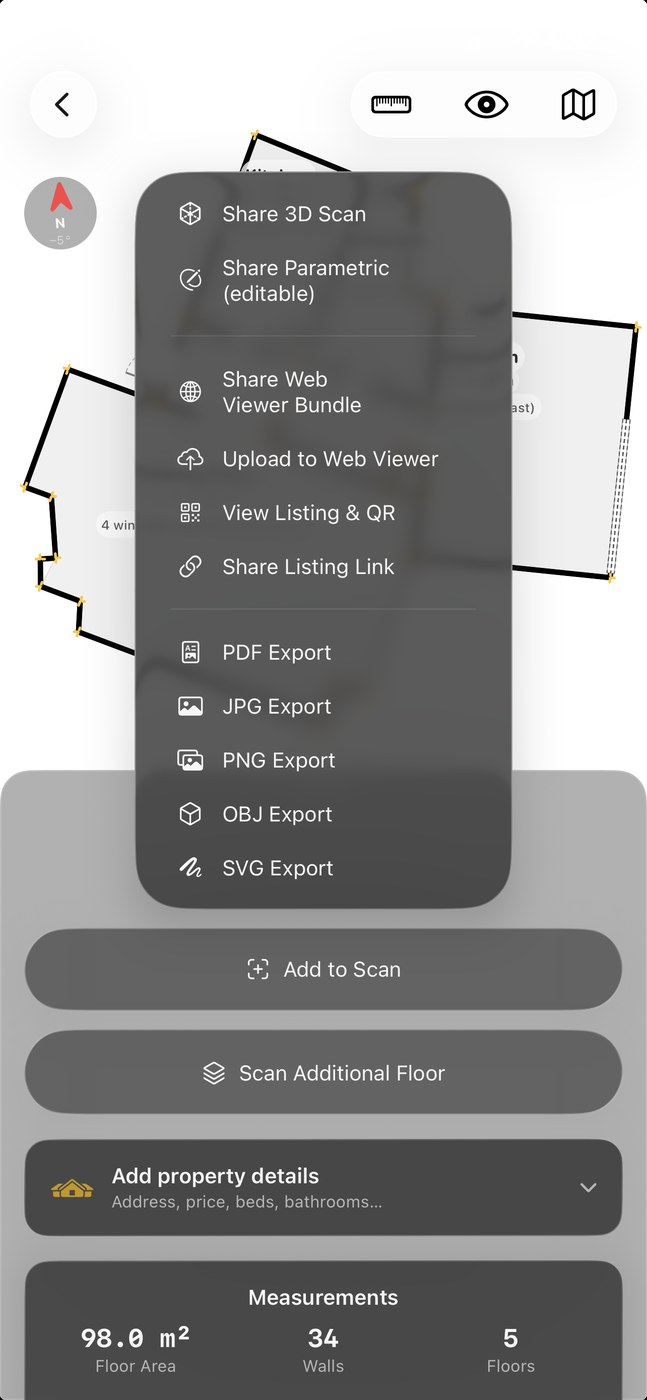
Your scan is not locked in. Export a full PDF with measurements and property info, the textured 3D model as GLB, USDZ or OBJ, the current view as JPG, PNG or SVG, or share the 3D link. iCloud keeps everything in sync across your devices.
Which 3D format should you use? → Get started → Swiss privacy by design
A scan of your home is about as revealing as data gets: every room, every measurement, every photo. That's why FloorLens is built the other way round. Nothing is uploaded unless you deliberately share it.
Scanning, floor plans and measurements all run on the iPhone itself. Neither the scan nor its location or photos are ever sent anywhere just to be processed.
You can scan, measure, edit and export for as long as you like without creating an account or logging in. Signing up is entirely optional.
A scan leaves your device only when you yourself tap “upload to web viewer”, and you can delete it from the cloud again whenever you want, straight from the app.
Planning, measuring and advertising a home costs nothing, and the free tier now includes one web share. Premium adds texture, full 3D, more simultaneous web shares and your own branding.
For planning, measuring & advertising your home.
or $2.99/week · $39.99/year
1-week free trial on every Premium plan.
For individuals & small real-estate agencies.
or $149.99/year
For busy agencies sharing at scale.
For agencies that share at scale.
Prices shown are US App Store prices. Pricing varies by country, and the App Store shows the price for yours.
FloorLens needs iOS 26 or later. Open Settings → General → Software Update to install it, if your device supports it.
FloorLens is an iPhone and iPad app. It relies on Apple's LiDAR scanner, so there is no Android version — and no plans for one.
Your device reports iOS {v}.
Requires iOS 26 and a LiDAR-capable device (iPhone 12 Pro or later, or iPad Pro).
An iPhone and iPad app that turns a LiDAR scan into a floor plan, a 3D model and a web link you can hand to anyone. The scan is aligned to the real world, down to magnetic north, and everything in it is measured automatically.
Any iPhone or iPad with a LiDAR sensor, meaning an iPhone 12 Pro or later, or an iPad Pro, running iOS 26 or later.
Scanning, measuring, AI floor plans and every export are free. You can also put one scan on the web at a time, with a link and QR code, though it deletes itself after 14 days. Premium costs $6.99/month in the US (or $2.99/week, $39.99/year; prices vary by country) and adds baked textures, full 3D, longer multi-scan web sharing and agency branding. 1-week free trial on every Premium plan.
Yes. A shared scan opens in the browser, on a phone or a laptop, with dollhouse, floor plan and first-person photo views. Clients install nothing and need no account.
Yes. You get a north-aligned floor plan with room areas, ceiling heights, door swings and window placements. Wall lengths, areas and object dimensions are measured automatically.
Yes, and the video export is free. FloorLens renders a fly-through of the whole property as an MP4. The camera moves through the 3D model and fades into the photos you took while scanning, so viewers see where each picture was taken. It works on plain and textured scans, and the clip ends with your name and logo, the key property figures and a QR code that opens the interactive 3D tour.
Whichever one your country uses. Pick a country profile and FloorLens applies its definition: Gross Living Area (ANSI Z765) in the United States, Gross Internal Area (GIA) in the United Kingdom and Ireland, RMS in Canada and Internal Area in Australia. 39 countries have a built-in standard, among them Wohnfläche (WoFlV) in Germany, surface habitable and Loi Carrez in France, NEN 2580 in the Netherlands, superficie útil in Spain, RERA carpet area in India and Saleable Area in Hong Kong. It measures to the correct face of the wall, includes or excludes below-grade space accordingly, and can show several figures side by side; generic gross, net and floor area work anywhere. Each room also shows its own area, length × width and ceiling height, and the same numbers appear in the app, in the PDF and on the shared web link.
No. They are estimates calculated from your scan, not a survey. A phone scan cannot see everything a legal definition counts, such as balconies, weightings for sloped ceilings or deductions for internal walls, and small scanning errors carry into the total. The figures are fine for advertising, planning and comparing; for a contract, a valuation or a land-registry entry, have the property measured by a qualified surveyor.
By default, yes. Scans, floor plans and measurements are computed on your iPhone, an account is optional, and nothing leaves the device until you decide to share it. Whatever you do upload stays yours and can be deleted from the cloud at any time, from inside the app. Swiss privacy by design →
Download FloorLens on the App Store for iPhone & iPad with LiDAR.
Download on the App Store On a computer? Scan this with your iPhone camera to open the App Store there.
Requires iOS 26 and a LiDAR-capable device (iPhone 12 Pro or later, or iPad Pro).